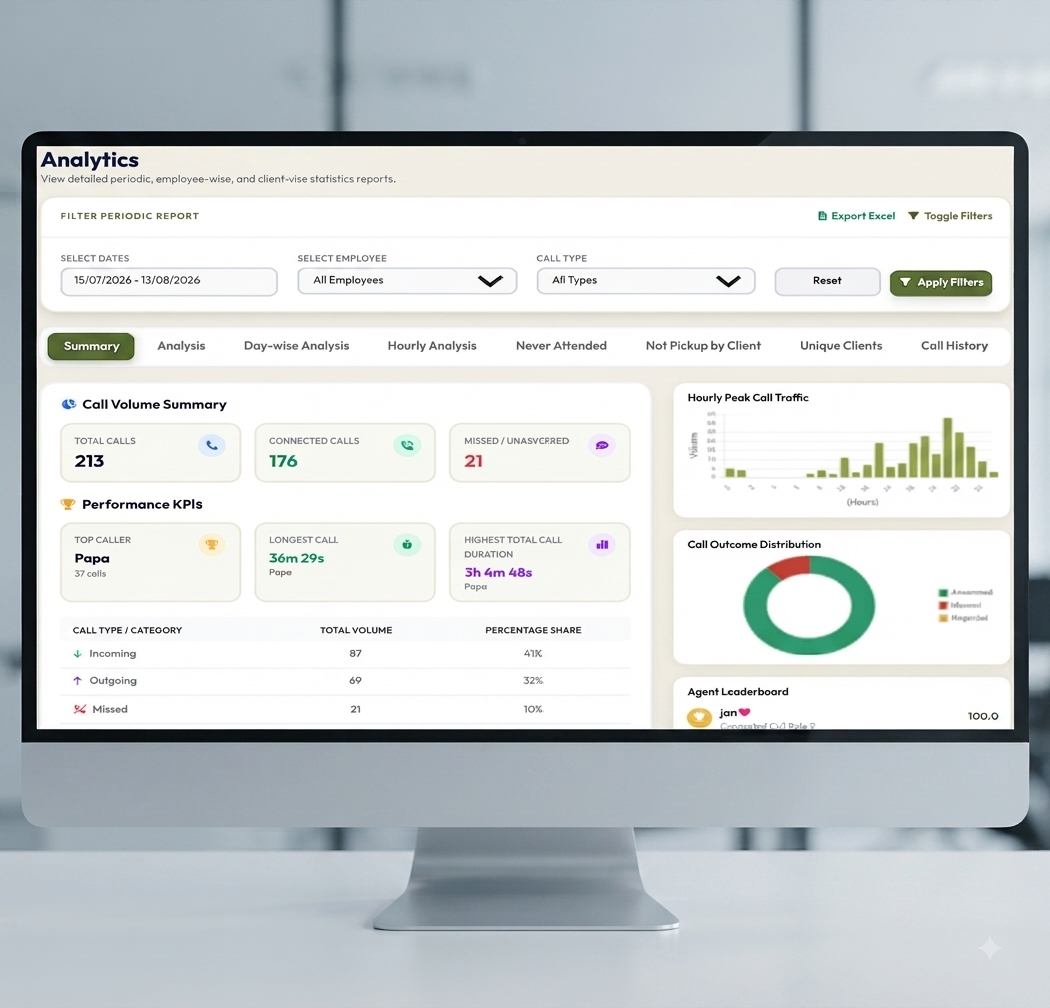
Call Insights: Turn Everyday Business Calls into Actionable Information
Your team handled hundreds of calls this week. Some customers received the information they needed, some calls went unanswered, and others required another conversation.
The total call count tells you how much activity took place. It does not explain where customers struggled to reach the team or what should change next week.
DialSummary’s Call Insights helps you review calling activity through breakdowns such as call type, duration and busy periods. These views give managers a starting point for investigating patterns and making practical changes.
The useful question is not simply, “How many calls did we make?” It is, “What does this activity tell us to check or improve?”
What Are Call Insights?
Call insights are patterns drawn from the calling data available in your workspace.
Rather than examining every record individually, you can review summaries to understand how activity changes across a selected period.
These summaries can help you explore questions such as:
- When does the team receive the most calls?
- Are missed calls concentrated around certain hours?
- How does incoming activity compare with outgoing activity?
- Has talk time changed?
- Which patterns need a closer look at individual records?
A summary helps identify where to investigate. The underlying records and customer context help explain what happened.
Call statistics do not, by themselves, reveal customer satisfaction, buying intent or conversation quality.
Start With a Question Before Opening a Report
A report is easier to use when you know what you want to learn.
“Review this month’s performance” is broad. A more focused question gives you a clearer path:
- Why did missed calls increase last week?
- Are customers contacting us before the main shift starts?
- Did an adjusted calling schedule change the number of answered attempts?
- Is one employee handling a different mix of calls from the rest of the team?
Choose the relevant period and filters, then review the information connected with that question.
This keeps the discussion focused on a decision rather than a collection of numbers.
Understand the Call Categories
Different call categories represent different situations.
An incoming call reflects a customer trying to reach the business. An outgoing call reflects an attempt by the team to contact someone. A missed call may need a callback or a closer look at availability.
When reviewing the categories available in your workspace, ask what action each pattern might require.
For example:
- More incoming calls: Check whether coverage matches demand.
- More missed calls: Investigate timing, availability and subsequent callbacks.
- More outgoing attempts: Check whether they are reaching customers.
- Repeated unsuccessful attempts: Review contact details, timing and the customer’s preferences.
Avoid combining unlike categories into a conclusion that the data cannot support. A high number of outgoing attempts is not the same as a high number of completed customer conversations.
Find Busy Periods and Review Coverage
Hourly patterns can help you identify when calling activity rises.
A daily total may look manageable while hiding a short period when several customers try to reach the team at once.
Review busy periods alongside practical information such as:
- Employee schedules
- Breaks and meetings
- Campaign activity
- Customer callback preferences
- Time needed for work after a call
A busy-hour pattern is a reason to investigate coverage, not automatic proof that more staff are needed.
A schedule adjustment, clearer callback ownership or a change in meeting time may be enough to address the problem.
A Practical Example: Investigating Missed Calls
Consider this fictional example.
A support team notices that missed incoming calls increased during the previous week. The manager initially assumes that overall demand has risen.
The hourly breakdown shows that most of the increase occurred between 1 p.m. and 2 p.m. Reviewing the schedule reveals that several employees take lunch at the same time.
The manager decides to test staggered breaks while maintaining the team’s break arrangements.
For the next comparable period, the team reviews:
- Incoming call volume during that hour
- Missed calls during that hour
- Available employee coverage
- Whether missed callers received a callback
Suppose one period had 20 missed calls out of 100 incoming calls, while the next had 12 out of 120. The missed-call share would have changed from 20% to 10%.
That would be a useful signal, but it would still need context. The team should check that the periods, categories and working conditions are comparable before attributing the change to the schedule.
The report identifies a problem worth investigating. The team tests a response and checks the result.
Read Call Duration With Context
Call duration can help you notice changes in the work being handled. It should not become a simple ranking of employees.
A short call may successfully confirm an appointment. A longer call may involve a complex service question. Several brief calls may reflect unanswered attempts, depending on the records included.
Before interpreting a change in talk time, ask:
- Are these similar types of calls?
- Did the customer mix change?
- Were employees handling new or more complex questions?
- Does the calculation include the same call categories?
- Are a few unusually long calls affecting the average?
Longer does not automatically mean better, and shorter does not automatically mean rushed.
If a duration pattern raises a question, review suitable records and speak with the employees involved.
Compare Like With Like
Comparisons become misleading when the underlying conditions differ.
An employee handling new enquiries may have a different calling pattern from someone resolving existing customer issues. A five-day week should not be compared directly with a week containing holidays without acknowledging the difference.
Before comparing periods or employees, check:
- The number of working days
- The selected date range
- Employee availability
- The type of work assigned
- Relevant filters
- Whether expected data has synced
Use the same definitions across reports. If “answered calls” means one thing in one summary and another in a separate spreadsheet, the results will be difficult to interpret.
Move From a Summary to the Relevant Records
An unusual pattern is a starting point.
If you notice repeated contact attempts or a change in missed calls, examine the relevant records to understand the sequence of activity.
DialSummary Full Call History provides a way to locate available call records and review details such as timing, employee and duration.
Where notes are available, use them to understand the customer context. Where an authorised recording is available and relevant, it may help clarify a particular conversation.
This prevents a broad summary from becoming a conclusion about an interaction you have not reviewed.
Turn Findings Into Specific Team Actions
A useful insight should lead to a clear response.
“Improve calling performance” is difficult to act on. A more specific action might be:
- Assign responsibility for reviewing missed incoming calls.
- Adjust coverage during a consistently busy period.
- Check contact details behind repeated unsuccessful attempts.
- Review a recurring question with the team.
- Agree on a suitable callback time with customers who are difficult to reach.
For each action, record who owns it, when it will be reviewed and what evidence will help assess the result.
Keep changes manageable. If you alter the calling schedule, staffing, scripts and lead source at the same time, it becomes harder to understand what affected the outcome.
Share Reports With the Question and Context
Exported reports are more useful when the recipient understands their scope.
When sharing a report, include:
- The period covered
- The team or employee selection
- Relevant filters
- The question being investigated
- Any known gaps or unusual conditions
- The proposed next action
A short explanation can prevent a number from being interpreted incorrectly.
Share customer and employee data only through approved channels with the people who need it for their work.
Build a Simple Review Routine
A regular review does not need to involve every available metric.
Start with a small set of questions:
- What changed? Identify a meaningful difference in activity.
- What might explain it? Check records and working conditions.
- What should we do? Choose a specific, proportionate action.
- How will we review it? Agree on a comparable period and measure.
Some changes will need immediate attention. Others may need more data before a decision is justified.
The aim is to make better-informed decisions, not to react to every daily fluctuation.
Make Your Next Report Useful
DialSummary’s Call Insights helps teams see patterns that are difficult to spot in a long list of individual calls.
Its value comes from connecting those patterns with the way your team works: when customers call, who is available, what the records show and where follow-up is needed.
Choose one question, review the relevant data and agree on one action to test. That is a practical way to turn everyday calling activity into useful information.
Explore DialSummary Call Insights for the feature overview, or visit the DialSummary Help Centre for available product guidance.