Lead Tracker: Never Lose Sight of a Valuable Sales Opportunity
A promising sales call ends with a simple request: “Send me the details and call me on Friday.”
The representative sends the information, takes a few more calls and moves on with the day. By Friday, that conversation is buried beneath new enquiries. Nobody remembers whether the customer received a quotation or who was supposed to call back.
The opportunity has not necessarily disappeared. The next step has simply been missed.
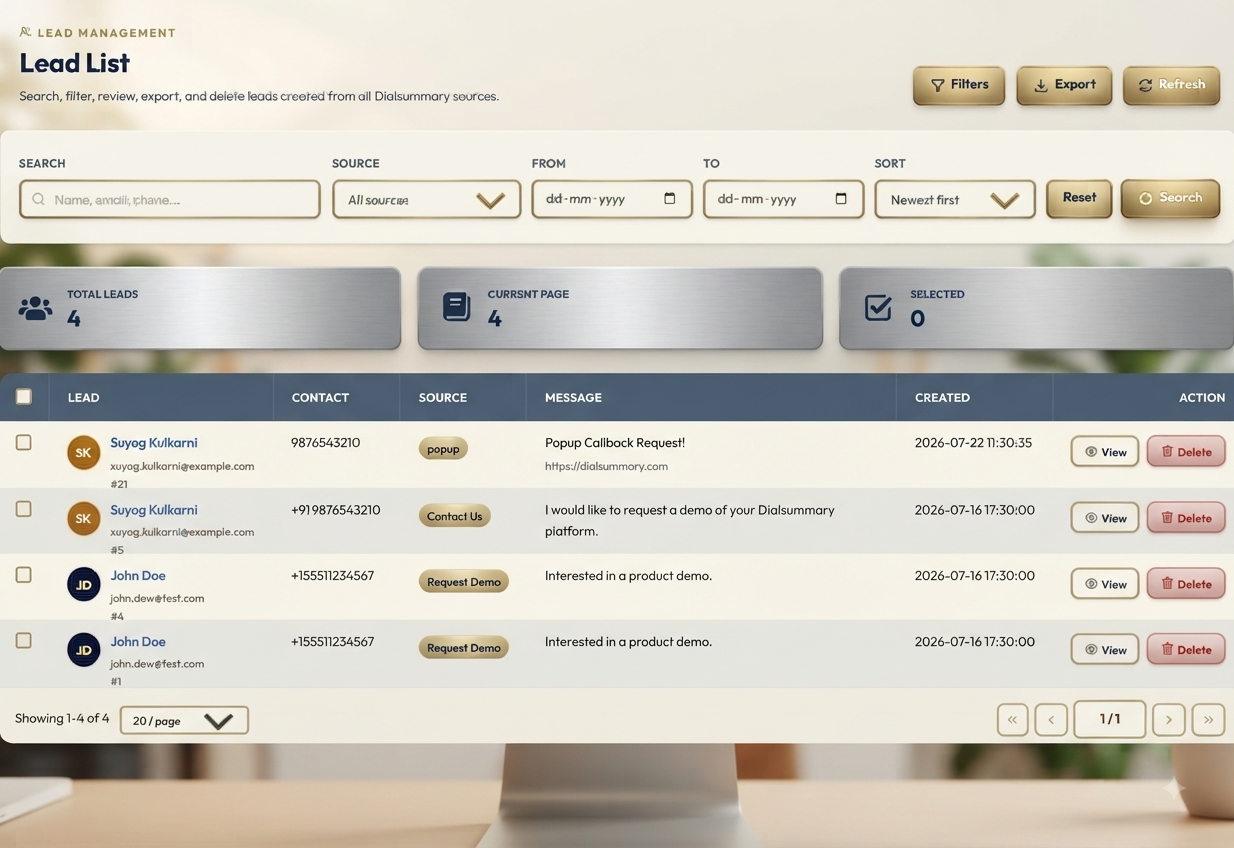
DialSummary’s Lead Tracker helps teams keep customer information, conversation notes and follow-up details organised so employees can pick up a conversation with the right context.
What Is Lead Tracking?
Lead tracking means keeping a clear record of a potential customer’s progress—from the first enquiry to a decision.
A useful lead record should help an employee answer four questions:
- Who is the customer, and what do they need?
- What happened in the last conversation?
- Who is responsible for the lead?
- What should happen next?
DialSummary’s Lead Tracker brings lead information and sales activity into a structured workspace. Rather than relying on memory or searching through separate notes, employees can review the record before contacting a customer.
The purpose is to make the next action clear, not simply to build a longer contact list.
Keep Customer Details and Conversation Context Together
A name and phone number tell you how to reach someone. They do not tell you why that person contacted your business.
Record the details that will help the next conversation move forward:
- The product or service the customer is considering
- Their main requirement
- Questions or concerns they raised
- Information already shared
- The employee handling the enquiry
- The agreed next step
For example, “Interested in software” provides little direction. “Needs a way for two supervisors to review follow-ups across a 12-person calling team” gives the representative something specific to discuss.
Keep notes relevant to the enquiry. Avoid collecting personal information that your team does not need.
Use Lead Status to Reflect What Has Actually Happened
A lead’s status should describe its current position accurately.
A customer who has requested a demonstration is at a different stage from someone who has not answered the first call. Treating both as simply “active” makes it harder to decide where attention is needed.
Use the statuses available in your workspace consistently. Agree within the team on what each one means and when it should change.
For example:
- A new enquiry needs an initial response.
- A customer who requested more information needs that information delivered.
- A prospect reviewing a quotation may need a follow-up on an agreed date.
- A customer who has declined should have that outcome recorded.
These are examples of sales situations, rather than a fixed list of DialSummary status options.
Update the status after a meaningful interaction while the details are still fresh.
Give Each Active Lead a Specific Next Step
“Follow up later” is easy to overlook because it leaves too much undecided.
A useful follow-up record explains:
- When: The agreed date and time
- Why: The purpose of the next conversation
- Who: The employee responsible
- What: Any information or preparation needed beforehand
Compare these two notes:
Follow up next week.
Call on Tuesday at 11:30 a.m. to discuss the quotation. Send the revised scope before the call. The customer wants to confirm whether onboarding support is included.
The second note tells the representative what to do and gives another employee enough context to help if necessary.
When no callback has been agreed, record the proposed next action clearly instead of treating it as a customer commitment.
A Practical Example: From Enquiry to Follow-Up
Consider this fictional sales enquiry.
A customer contacts your team about a service for a growing business. They are interested, but need their manager to review the proposal before making a decision.
After the first call, the representative records:
- Requirement: A solution suitable for a 12-person team
- Main question: What support is included during setup?
- Information requested: A quotation and an outline of the setup process
- Next action: Send both documents by Thursday
- Agreed callback: Monday at 3 p.m., after the manager’s review
- Owner: The representative handling the enquiry
Before Monday’s call, the employee checks the record and confirms that the documents were sent.
The next conversation can begin with:
“You mentioned that your manager would review the proposal. Were there any questions about the setup support?”
That is more useful than starting again with, “Are you still interested?”
If the customer needs more time, the representative records the reason and agrees on another suitable step.
Prioritise Leads Based on Commitments and Readiness
The newest lead is not always the one that needs attention first.
A customer waiting for a promised quotation may need a response before someone who has asked to reconnect next month. Likewise, a demonstration scheduled for this afternoon needs preparation before a routine check-in.
When reviewing your leads, look for:
- Commitments due today
- Customers waiting for information
- Agreed callbacks
- Questions preventing a decision
- Opportunities with a genuine deadline
- Active leads without a clear next action
Do not judge interest only by the number of calls made. Several unanswered attempts do not necessarily mean an opportunity is progressing.
The customer’s responses, requirements and agreed actions provide better context.
Write Notes That Another Employee Can Understand
Lead notes are most useful when they help someone prepare for the next interaction.
Avoid vague entries such as “Good call” or “Customer interested.” Write down what changed during the conversation.
A short, useful note might read:
Customer reviewed the proposal and asked whether training is included. Clarification is due tomorrow. They will discuss the revised proposal internally before confirming the next meeting.
There is no need to transcribe the entire call. Capture the requirement, unresolved question, commitment and next step.
Clear notes also make handovers easier. If the assigned employee is unavailable, an authorised colleague can understand the situation without asking the customer to repeat everything.
Make Lead Reviews Part of the Working Day
Keeping records current is easier when updates happen alongside the work.
At the start of the day, review callbacks, promised information and leads needing a first response.
After each meaningful conversation, update the notes, status and next action.
Before finishing the day, check whether any commitments remain incomplete. If something will be delayed, communicate that to the customer and record the revised plan.
Managers can use the same information to identify where help is needed. A lead may be waiting on a pricing decision, product clarification or internal approval rather than another sales call.
A useful review asks, “What is holding this up, and who can help?”
Common Lead-Tracking Mistakes to Avoid
Recording Activity Without Recording the Outcome
“Called customer” does not explain whether the call connected or what was discussed. Add the result and any agreed action.
Leaving Old Statuses Unchanged
An outdated status can cause unnecessary follow-ups or hide an opportunity that has progressed. Update it when the customer’s position changes.
Assigning a Lead Without a Clear Handover
When ownership changes, include the current requirement, pending commitments and next contact date.
Keeping Important Details in Personal Notes
If information is needed to manage the lead, record it in the shared workspace available to authorised team members.
Following Up Without Reviewing the History
Read the latest notes before calling. This helps avoid repeated questions and messages that no longer fit the customer’s situation.
Give Every Lead a Clear Next Step
Lead tracking cannot guarantee a sale. Customers may change priorities, choose another provider or decide not to proceed.
What your team can control is how reliably it responds, records commitments and follows through.
DialSummary’s Lead Tracker supports that work by helping employees organise lead information and maintain continuity between conversations.
Start with a review of your active leads. Check that each one has an owner, an accurate status and a clear next action. Those details make it easier to give worthwhile opportunities the attention they need.
For help with DialSummary’s workflows, visit the DialSummary Help Centre.