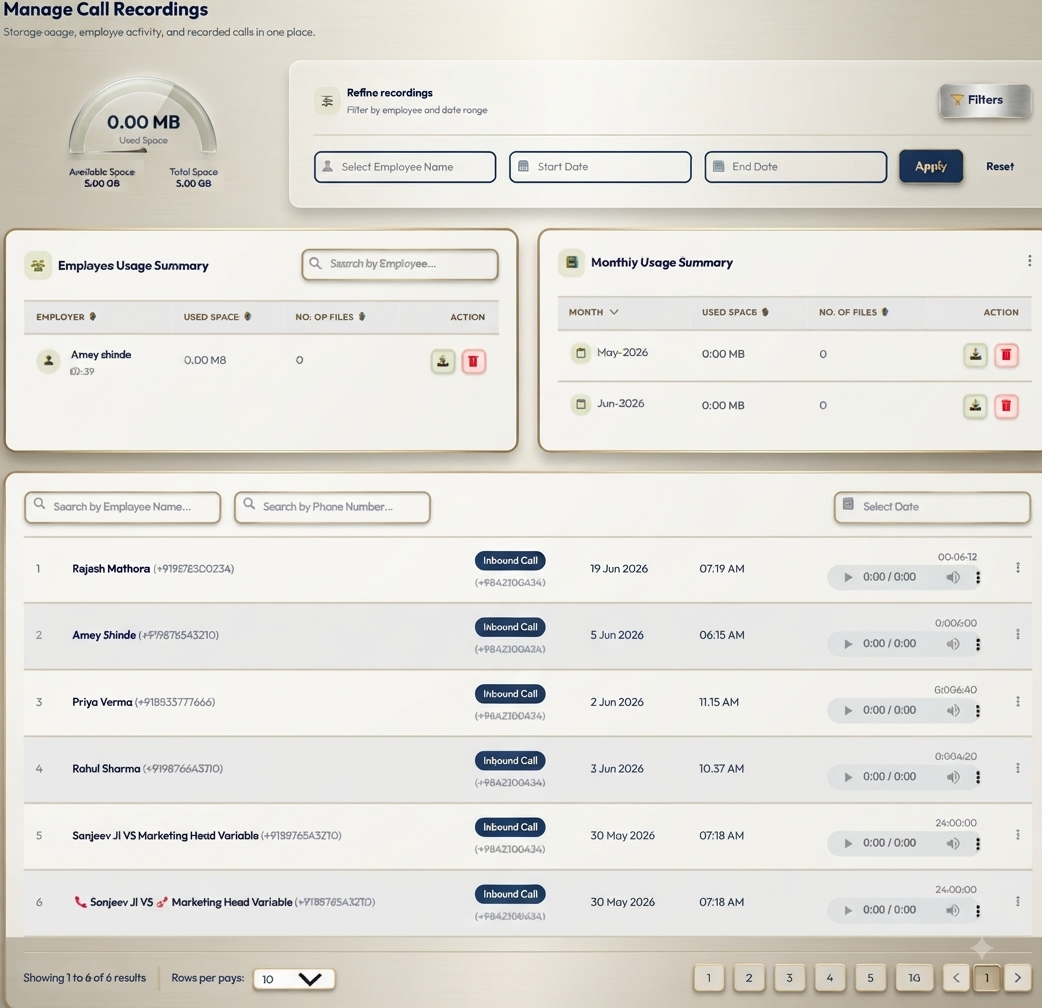
Manage Recordings: Review Important Customer Conversations with Confidence
A customer remembers being promised a callback on Thursday. The employee’s notes say Friday. Another customer asks whether setup support was included in the price, but the call summary does not mention it.
Small gaps like these can make the next conversation difficult.
DialSummary’s Manage Recordings feature helps authorised users organise and review available synced call recordings. When notes are incomplete or a conversation needs clarification, a recording can provide useful context.
The value comes from listening with a purpose: confirming a detail, understanding a concern or helping an employee improve a specific part of their communication.
What Is Manage Recordings?
Manage Recordings provides a workspace for accessing available recordings associated with customer calls.
Instead of relying entirely on memory, authorised team members can revisit a conversation and compare what was discussed with the notes and follow-up actions.
A review can help answer questions such as:
- What did the customer ask for?
- Which information did the employee provide?
- Was a commitment made?
- What remained unresolved?
- What did both people agree would happen next?
Recording availability depends on the recording and sync setup. A call appearing in the system does not necessarily mean a playable recording is available.
Start With the Conversation You Need to Review
Before opening a recording, identify the interaction as accurately as possible.
Use the call information available in your workspace, such as the customer’s phone number, call date, employee or duration, to distinguish it from other conversations.
This matters when a customer has spoken to several employees or received multiple calls on the same day.
Before drawing a conclusion, check that you are reviewing:
- The correct customer
- The relevant date and time
- The employee involved
- The conversation connected with the question
If the audio is incomplete or unclear, acknowledge that limitation. A missing section should not be treated as evidence that something was never discussed.
Confirm Customer Requirements Before Following Up
Notes written during a busy call may capture the main topic but miss an important condition.
For example, a note might say:
Customer requested a proposal for team training.
The conversation may contain an additional requirement: training must take place after working hours and include new employees joining next month.
Reviewing the relevant recording can help the representative confirm those details before preparing the proposal.
Listen for:
- The customer’s main requirement
- Any conditions or limitations they mentioned
- Questions that still need an answer
- Information the employee promised to send
- The agreed follow-up arrangement
After reviewing, add the relevant details to the lead or call notes. This makes the information easier to use without repeatedly listening to the same conversation.
A Practical Example: Clarifying a Sales Commitment
Consider this fictional situation.
A customer contacts your team because they expected a revised quotation that morning. The representative remembers agreeing to send it after an internal pricing review.
An authorised manager locates the relevant recording and listens to the discussion around the quotation.
The review reveals that the employee said:
“I’ll check the revised pricing tomorrow morning and update you.”
The employee meant they would provide a progress update. The customer understood that the completed quotation would arrive that morning.
The next step is to clarify the misunderstanding and agree on a realistic delivery time.
The manager can also coach the employee to use more precise wording:
“I’ll update you by 11 a.m. tomorrow. If pricing approval is still pending, I’ll let you know when to expect the quotation.”
The review produces two useful outcomes: a clearer response to the customer and a specific improvement for future conversations.
Make Quality Reviews Specific and Fair
A recording gives managers a concrete conversation to discuss. That is more useful than broad feedback such as “Be more confident” or “Improve your communication.”
Choose a few aspects to review:
- Opening: Did the employee explain the reason for the call?
- Listening: Did they allow the customer to explain their requirement?
- Questions: Did they clarify anything uncertain?
- Explanation: Was the information understandable and relevant?
- Commitments: Were promises realistic and clearly stated?
- Closing: Did both people understand the next step?
Consider the context as well. A difficult call, poor connection or unresolved service issue can affect the conversation.
Use individual recordings as examples, not as a complete judgement of an employee’s performance.
Turn Call Reviews Into Useful Coaching
A productive coaching discussion focuses on something the employee can practise.
For example, instead of saying:
“You need to handle questions better.”
Try:
“The customer asked whether support was included, but the answer moved straight to pricing. On the next call, answer the support question first, then check whether they need more detail.”
A simple coaching routine is:
- Select a relevant conversation.
- Ask the employee how they think it went.
- Review a specific moment together.
- Discuss what worked and what could be clearer.
- Agree on one action to practise.
Recognise effective communication too. A well-phrased question or clear explanation can be worth sharing with authorised colleagues when appropriate.
Training examples should help employees understand a technique without exposing unnecessary customer information.
Review Misunderstandings With an Open Mind
A recording can help clarify a disagreement about pricing, included services, delivery expectations or a promised follow-up.
Listen to the surrounding discussion rather than relying on one isolated sentence. A statement may have been conditional, corrected later or misunderstood because of unclear wording.
Compare the conversation with any relevant written quotation, message or agreement.
The purpose is to establish what can reasonably be understood from the available information and decide what needs to happen next.
If the recording does not resolve the question, say so. Avoid presenting an uncertain interpretation as a confirmed fact.
Look for Improvements Across Several Conversations
One call can reveal a specific issue. Several reviews may show a recurring pattern.
For example:
- Customers repeatedly ask for a simpler product explanation.
- Employees describe the same service differently.
- Calls end without a clear follow-up arrangement.
- A common question is missing from the team’s reference material.
These patterns can guide practical changes to training, product information or message templates.
Do not assume that wording from one successful call will work in every situation. Look at the customer’s needs and the wider conversation before recommending an approach to the team.
Handle Recordings With Care
Customer conversations may contain personal or commercially sensitive information.
Access and review recordings only for an authorised business purpose. Follow your organisation’s recording, consent, access and retention policies, including the requirements that apply to your business.
Avoid downloading or sharing recordings simply for convenience. Use approved channels, limit access to the people who need it and avoid including unnecessary customer details in training material.
The ability to access a recording does not automatically make every use of it appropriate.
What If a Recording Is Missing or Will Not Play?
First, confirm that you have selected the correct call.
Then check whether the recording is available, whether the relevant sync has completed and whether your account has the required access.
If the problem continues, note:
- The call date and approximate time
- The affected employee or account
- Whether the recording is missing or fails during playback
- Any error message displayed
- Whether the issue affects one call or several
Share these details through your approved support channel. Avoid sending the recording or customer information unless it is needed and you are authorised to share it.
You can visit the DialSummary Help Centre for available product guidance.
Finish Every Review With a Clear Action
Listening to a recording is only the first step.
A useful review should lead to an outcome: corrected notes, a clarified commitment, an answer for the customer or a specific coaching action.
Before closing the review, ask:
- What did we confirm?
- What remains uncertain?
- Does the customer need an update?
- Who will complete the next action?
- When should it be completed?
DialSummary’s Manage Recordings feature supports a more informed review of customer conversations. Used thoughtfully, available recordings can help teams follow up with better context, address misunderstandings and make feedback more practical.
Start with one conversation that needs clarification. Review it carefully, record what matters and act on what you learn.