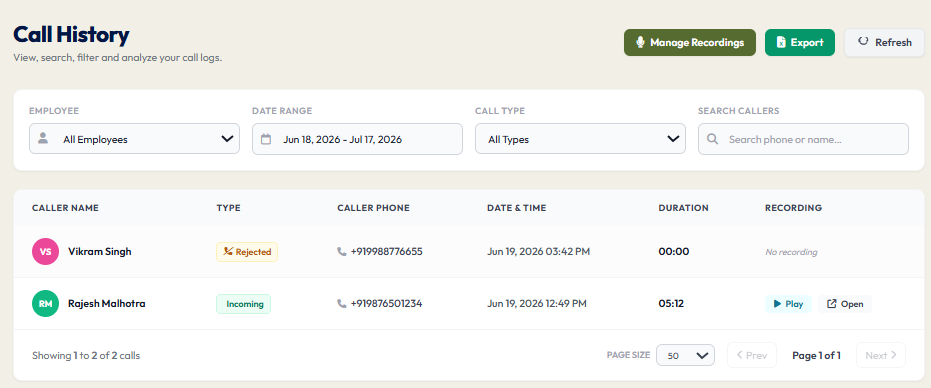
Full Call History: Access Every Customer Call from One Organized Workspace
A customer calls your office and says, “I spoke with someone on your team yesterday.”
Before continuing, the employee needs a few details. Who handled the call? When did it happen? Was another conversation already scheduled?
Without an organised history, answering those questions can mean checking individual phones, searching through messages or asking colleagues to recall the conversation.
DialSummary’s Full Call History brings available synced call records into one workspace, helping authorised users find previous interactions and prepare for the next conversation.
It gives teams a practical way to review calling activity without depending entirely on memory.
What Is Full Call History?
Full Call History is a searchable record of calling activity available in DialSummary.
Employees and managers can use it to locate earlier calls, review their details and understand the sequence of customer contact.
Depending on the information available for a record, this may include:
- The customer’s phone number or saved contact details
- The call date and time
- The employee associated with the call
- The call type and duration
- Related notes
- A recording, where available
Call history and call recordings are different. A call record provides information about an interaction; it does not necessarily include playable audio.
The records visible to a user also depend on their access and the data successfully synced to the workspace.
Find the Right Conversation Before Calling Back
A quick review of previous activity can make a follow-up more useful.
Before contacting a customer, check when the team last attempted to reach them and whether any relevant notes are available.
For example, an employee may discover that a colleague already spoke with the customer that morning. Calling again with the same introduction could create confusion.
Reviewing the history first helps the employee decide whether to:
- Continue an existing conversation
- Respond to a pending question
- Make another contact attempt
- Coordinate with the colleague handling the enquiry
The most useful next call starts with an understanding of what has already happened.
Use Filters to Narrow the Search
A busy team can generate a long list of call records. Searching without a clear starting point makes it harder to locate the interaction you need.
Use the available filters, such as date range, employee and call type, to narrow the results.
Start with what you know:
- If the customer says they called yesterday, select that date.
- If a particular employee handled the enquiry, narrow the list to that person.
- If you are reviewing unanswered contact attempts, use the relevant call category.
- If you have the customer’s number, use it to identify matching records.
When several calls match, compare their times and other details before selecting one.
This is particularly useful when the same customer has contacted different employees or spoken with the team more than once.
A Practical Example: Returning a Customer’s Call
Consider this fictional situation.
A customer contacts your business on Monday to ask about a service. An employee discusses the requirement and agrees to send more information.
On Tuesday, another employee sees a request to call the same customer.
Before dialling, they review the available history and notes. They find Monday’s interaction and learn that the customer is waiting for information about setup support.
Instead of repeating the introductory questions, the employee can begin with:
“You spoke with our team yesterday about setup support. I’m calling to check whether you received the information and whether anything needs clarification.”
The customer can continue from the previous conversation rather than explain the enquiry again.
If the history contains only the call details and no useful notes, the employee can contact the colleague involved before making assumptions about what was discussed.
Understand Contact Attempts Without Guessing
Call history helps teams distinguish between an attempted call and a completed conversation.
That distinction matters when reviewing follow-ups. Several outbound calls may represent repeated unanswered attempts rather than several discussions with the customer.
Look at the available call type, duration and notes together.
For example:
- A missed incoming call may need a response.
- An unanswered outgoing attempt may need another suitable contact time.
- A completed conversation may have produced a specific next action.
- Several calls close together may need context before another employee follows up.
A call count alone does not explain the customer’s situation. Use the record to understand the activity, then review any supporting context.
Make Handovers Easier
Customer communication can become difficult when the employee who handled an enquiry is unavailable.
An organised history gives authorised colleagues a starting point. They can identify previous interactions, see who was involved and review the information available with the record.
For a useful handover, the team should also keep clear notes about:
- The customer’s current requirement
- Information already provided
- Questions still awaiting an answer
- Commitments made by the business
- The agreed next step
Call history helps establish when contact happened. Good notes explain what the next employee needs to know.
If the enquiry is also being managed as a lead, keep ownership and next actions current in the relevant workflow. Explore DialSummary Lead Tracker for more information about organising sales opportunities.
Review Team Activity With Context
Managers can use call history to examine activity over a selected period and understand where further attention may be needed.
Useful review questions include:
- Are customer callbacks being attempted?
- Have several employees contacted the same person?
- Are repeated attempts receiving a response?
- Is an employee waiting for help before continuing an enquiry?
- Do the available notes explain the next action?
Avoid treating call duration as a complete measure of quality. A short call may successfully confirm an appointment, while a longer call may involve a complex support question.
Use activity records to ask better questions, rather than drawing conclusions from a single number.
Use Recordings When a Detail Needs Clarification
Sometimes a call record and its notes are not enough to answer a question.
A customer may remember a different delivery date, or an employee may want to confirm exactly what information was requested.
Where a recording is available and access is authorised, it can provide additional context.
First confirm that it belongs to the relevant interaction. Then listen to enough of the conversation to understand the detail in context.
For more about reviewing available audio, visit DialSummary Manage Recordings.
Export Records for a Defined Reporting Task
The CSV export option can help teams work with call data in a spreadsheet.
Before exporting, decide what the report needs to answer. You might be reviewing activity for a particular employee, checking a selected period or preparing an internal summary.
After downloading, confirm that the exported records cover the intended scope before using them in a report.
Keep exported files in an approved location and share them only with people who need access. A downloaded file should not become a separate, outdated source of customer information.
What If You Cannot Find a Call?
A missing search result does not immediately explain why the call is absent.
Check the basics first:
- Review the date range. Make sure it includes the interaction.
- Clear unnecessary filters. An employee or call-type selection may be hiding the record.
- Check the phone number. Look for differences in formatting or the contact details used.
- Confirm access. Your account may not display every employee’s activity.
- Check sync status. The relevant data may not yet be available in the workspace.
If the record is still missing, note the approximate call time, employee and issue before contacting support through an approved channel.
The DialSummary Help Centre provides access to available product guidance.
Make Call History Part of Your Daily Workflow
Call history becomes more useful when employees consult it before acting.
Before a callback, review the latest interaction. After a meaningful conversation, keep the relevant notes and next steps current. During a handover, make sure the receiving employee understands what remains outstanding.
DialSummary’s Full Call History helps teams locate previous activity and continue customer conversations with better context.
Start with the last interaction, confirm what is known and make the next conversation count.