CRM Sync: Connect Your Call Data with Your Customer Management Workflow
A new list of enquiries arrives in a spreadsheet. A manager divides the contacts among employees, and the team starts calling.
By the afternoon, several copies of the file are in use. One contains updated phone numbers, another has follow-up notes, and a third shows who was supposed to contact each customer.
The difficulty is no longer finding leads. It is keeping the information organised as the team works through them.
DialSummary’s CRM Sync helps bring lead records into a structured workflow where teams can import customer information, review records, assign ownership and update lead status.
For teams working from spreadsheets, this provides a practical starting point for managing customer enquiries alongside their calling work.
What Does CRM Sync Help Your Team Do?
CRM Sync supports the process of bringing lead information into DialSummary and preparing it for the people who will work on it.
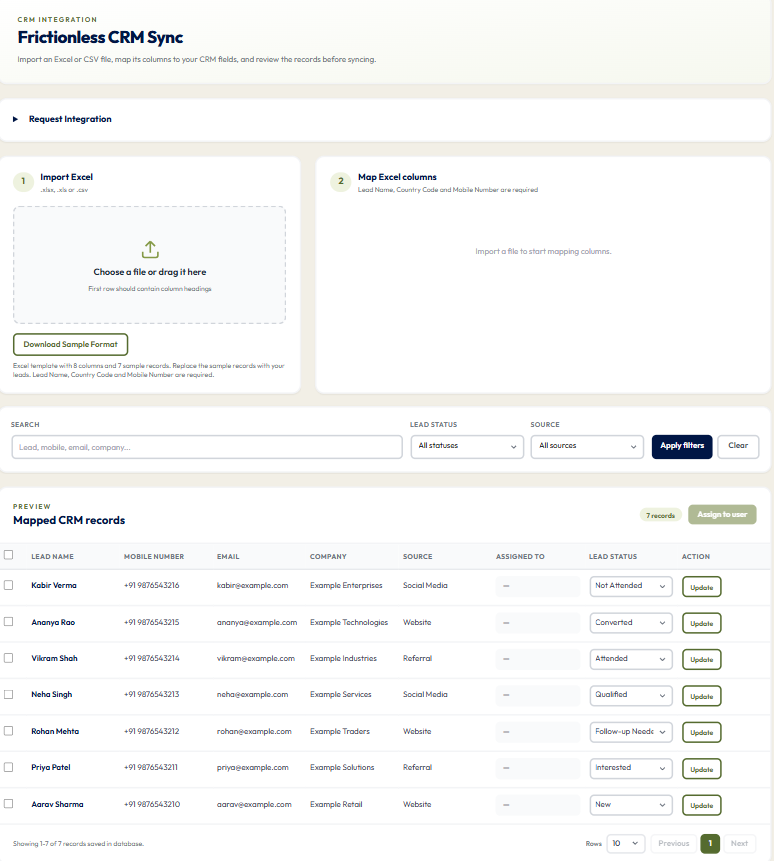
The spreadsheet workflow involves three main steps:
- Import the file containing your lead records.
- Map the columns so each value goes into the correct field.
- Review and assign the records before the team starts working through them.
Once the leads are available, employees can use the list to find records and update their status as conversations progress.
If your business needs a connection with an external CRM, confirm the supported integration and setup with DialSummary. Spreadsheet import should not be treated as confirmation that every external CRM has an automatic, two-way connection.
Prepare Your Spreadsheet Before Importing
A few minutes spent checking the source file can prevent avoidable corrections later.
Start with Download Sample Format in CRM Sync. Use its headings as a reference and replace the example records with your own customer information.
The required fields are:
- Lead Name: The person or contact your team will recognise.
- Country Code: The dialling prefix, kept separate from the mobile number.
- Mobile Number: The customer’s number without the separate country prefix.
You can also include relevant information such as email address, company name, source, lead status and notes.
Keep phone fields formatted as text in your spreadsheet. This helps preserve prefixes and leading zeroes instead of allowing the spreadsheet to change their format.
Before uploading, check that:
- The first row contains clear, unique column headings.
- Required fields contain values for every lead.
- Customer details are placed in the correct columns.
- The file contains the records you intend to import.
- Sample contacts have been removed.
CRM Sync accepts Excel and CSV files. For an Excel workbook containing several sheets, place the lead data on the first sheet used by the importer.
Check the Column Mapping Carefully
Your spreadsheet may use different headings from the fields in DialSummary.
For example:
- “Contact Name” may correspond to Lead Name.
- “Dialling Code” may correspond to Country Code.
- “Contact Number” may correspond to Mobile Number.
Column mapping tells the importer where each value belongs.
Review the selections even when a heading is recognised automatically. A column called “Number” could contain a phone number, an internal reference or something else entirely.
Correct mapping is as important as correct data. A valid phone number placed in the wrong field will still create an unhelpful record.
Map each required field once. Use Do not import for columns you do not need, then apply the mapping when the required selections are complete.
Review Imported Records Before Assigning Them
After an import, compare a few records with the original spreadsheet.
Check names, phone numbers, company details and sources. Look at records from different parts of the file rather than checking only the first row.
This gives you a chance to catch issues before employees begin contacting customers.
Use search and the available Lead Status and Source filters to narrow the list. For example, a manager may want to review website enquiries separately from referral contacts before assigning them.
A successful import means the file was accepted. Your review confirms that the resulting records are useful for the team.
Give Each Lead a Clear Owner
When ownership is unclear, two employees may contact the same customer—or both may assume someone else is handling the enquiry.
To assign records, select the relevant leads, choose Assign to user, select the employee and confirm the assignment.
Check the selection count before confirming. When using the header checkbox, review which records on the displayed page are selected.
Ownership should reflect how your team works. You might divide enquiries by product knowledge, region, existing customer relationship or employee availability.
A lead assignment is useful when the employee also understands what needs to happen next. Include relevant context in the information available to them, especially when a customer is already waiting for a response.
A Practical Example: Working Through Event Enquiries
Imagine a small sales team receives a spreadsheet of enquiries collected at a business event.
Some visitors requested product information. Others asked for a demonstration, while a few wanted to reconnect later.
The manager prepares the file with:
- Customer names and contact details
- The event name as the lead source
- Company information where available
- Short notes describing each request
After uploading, the manager checks the column mapping and reviews the imported records. Leads are then assigned to employees familiar with the relevant products.
Before calling, each employee can use the available context to prepare a more relevant opening:
“You spoke with our team at the event and asked about managing follow-ups. Is now a suitable time to discuss what your team needs?”
After the conversation, the employee updates the lead status to reflect the outcome.
The spreadsheet has become a working list with identifiable owners and current outcomes.
Keep Lead Statuses Current
Importing leads is the beginning of the workflow. The records become less useful if their statuses stay unchanged after customer conversations.
When an outcome changes, select the appropriate Lead Status and save it using Update on the relevant row.
Use the available statuses consistently across the team. A manager should be able to understand what a status means without asking each employee for a separate explanation.
For example, distinguish between a customer who needs another conversation and one who has decided not to proceed, using the options available in your workspace.
Avoid marking a lead as progressed simply because a call was attempted. Record the outcome that actually occurred.
Common Import Problems and What to Check
A Required Field Is Missing
Check both the column mapping and the values in the spreadsheet. A correctly mapped heading will not resolve an empty cell in a required field.
Phone Numbers Look Different After Import
Review the original file for lost leading zeroes, changed prefixes or spreadsheet number formatting. Correct the source data before trying again.
Column Headings Are Duplicated
Give each column a distinct name so you can identify its purpose during mapping.
The Wrong Worksheet Was Imported
Check the first worksheet in the workbook and move the intended lead data there before uploading.
The Connection Failed After Submission
Inspect the saved list before repeating the import. A connection error does not always tell you whether the earlier submission was saved, and retrying without checking could create duplicate records.
Keep the Workflow Useful After the Import
An organised list needs regular attention.
At the start of the day, review new enquiries and records waiting for action. After meaningful conversations, update their outcomes. When ownership changes, make sure the receiving employee has enough context to continue.
Avoid keeping a separate spreadsheet as the only place where important changes are recorded. If employees rely on different versions of the same information, the original coordination problem returns.
For related practices around ownership and next actions, explore DialSummary Lead Tracker.
Start With a Small, Checked Import
Before uploading a large working list, start with a small set of genuine records you are authorised to use.
Check the mapping, review the results and confirm that assignment and status updates fit your team’s process. Correct any issues before bringing in the remaining records.
CRM Sync helps turn incoming customer information into a list your team can work through with clearer ownership and fewer repeated updates.
Prepare the data carefully, review what was imported and keep the records current as conversations progress.
Visit the DialSummary Help Centre for available product guides and support information.