DialSummary Mobile Templates: Better Customer Follow-Ups, Less Typing
A customer asks for product details after a call. Another needs a meeting confirmation. Someone else is waiting for an update on their support request.
These conversations are different, but employees often type the same introductions, explanations and closing lines throughout the day.
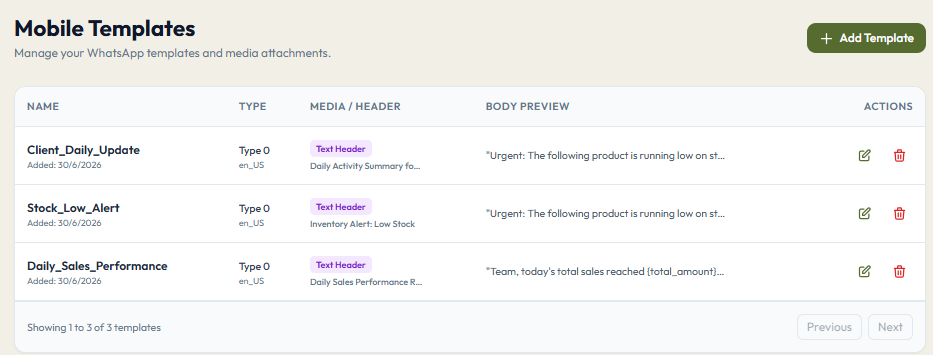
DialSummary’s Mobile Templates help reduce that repetitive work. Reusable messages give employees a starting point they can personalise for the customer and review before sending.
The aim is simple: spend less time rewriting routine messages and more time responding to what the customer actually needs.
What Are Mobile Templates?
Mobile Templates are prepared message formats for situations your team handles regularly, such as sharing information after a call or confirming a callback.
Instead of starting with an empty message, an employee can use suitable wording, update the details and check that it fits the conversation.
For an overview of the feature, visit the DialSummary Mobile Templates guide.
Start With the Messages Your Team Sends Most
You do not need a template for every possible conversation. Start with a few situations where employees repeatedly write similar messages.
Good starting points include:
- Sending product information requested during a call
- Confirming a meeting or demonstration
- Following up on a quotation
- Acknowledging a support request
- Confirming an agreed callback
Keep each template focused on one purpose. A meeting confirmation should make the meeting details easy to find. A support acknowledgement should explain what happens next.
Five Message Examples Your Team Can Adapt
The examples below are starting points. Replace every detail in square brackets before sending. These brackets indicate manual edits, not automatic fields in DialSummary.
1. Sharing Information After a Call
A useful follow-up reminds the customer why you are sending the information and where to look first.
Hi [Customer name],
As discussed on our call, here are the details of [product or service]: [link].
You mentioned that you need [customer requirement]. The section on [relevant topic] should help answer your question.
Please let me know if you would like to discuss anything after reviewing it.
[Employee name]
Avoid sending a collection of unrelated links. Share the information that helps the customer take their next step.
2. Confirming a Meeting or Demonstration
A confirmation should answer three questions: when is the meeting, how does the customer join, and what will you cover?
Hi [Customer name],
Confirming our [meeting/demo] on [date] at [time and time zone].
We’ll cover [main topic] and leave time for your questions.
Join here: [meeting link].
If your availability changes, please reply so we can reschedule.
[Employee name]
Check the meeting link before sending. Include the time zone when participants are in different locations.
3. Following Up on a Quotation
Give the customer enough context to recognise the quotation without searching through previous messages.
Hi [Customer name],
I’m following up on the quotation for [product or service] shared on [date].
Have you had a chance to review it? If you have questions about the scope, pricing or next steps, I can help clarify them.
[Employee name]
If the quotation has a genuine expiry date, mention it accurately. Avoid adding artificial urgency to a routine follow-up.
4. Acknowledging a Support Request
An acknowledgement should tell the customer that their issue has been understood and explain what information is needed next.
Hi [Customer name],
We’ve received your report about [brief description of the issue].
To help us investigate, please share [specific information needed].
I’ll send you an update by [agreed date and time], even if the investigation is still in progress.
[Employee name or support team]
Only include a response commitment your team can meet. An update time should not be presented as a guaranteed resolution time.
5. Confirming a Callback
A short confirmation can prevent confusion about when the next conversation will happen.
Hi [Customer name],
As agreed, I’ll call you on [date] at [time and time zone] to discuss [topic].
If another time would be more convenient, please let me know.
[Employee name]
Use this when a callback has actually been agreed. If you are proposing a time, phrase it as a question instead.
Personalise More Than the Customer’s Name
Adding a name is useful, but the rest of the message should also reflect the conversation.
Before sending, consider:
- What did this customer ask for?
- What information have you already shared?
- What did you agree to do next?
- Has anything changed since the last conversation?
For example, a customer who has already accepted a quotation should receive the next steps, not another reminder to review it.
The template supplies the structure. The employee supplies the context.
Check These Details Before Sending
A saved message can still contain an outdated price, an incorrect link or a forgotten placeholder.
Take a moment to check:
- Names: The customer and company details are correct.
- Dates: Meeting and callback times match the agreement.
- Information: Prices, product details and commitments are current.
- Links: Each link opens the intended page or document.
- Placeholders: No square-bracket instructions remain.
- Next step: The customer knows whether to reply, review something or attend a meeting.
For payment or account-related messages, use your organisation’s approved wording and verified destinations.
Keep Templates Easy to Find and Maintain
Name templates by the situation in which they should be used.
For example:
- Product enquiry — information after call
- Demo — meeting confirmation
- Quotation — awaiting customer response
- Support — request for more information
- Callback — agreed time confirmation
These names are easier to recognise than “Message 1” or “Follow-up 3.”
Review the collection whenever product details, pricing or business processes change. Remove duplicates and update wording that employees repeatedly have to correct.
If several employees rewrite the same sentence before sending, that is a useful sign that the template itself needs attention.
Build a Useful Collection, One Message at a Time
Start with three messages your team sends frequently. Use them in everyday conversations and ask employees what they still need to change.
Keep the wording that works, improve unclear sections and add new templates when a recurring need appears.
DialSummary Mobile Templates can make routine follow-ups easier to prepare. The most useful messages still feel relevant to the person receiving them: they refer to the conversation, provide the promised information and make the next step clear.
Explore the Mobile Templates guide to learn more, or visit the DialSummary Help Centre for related product guides.