How to Choose the Right Call Management Software for Your Business | DialSummary Blog
10 min read 0 views

How to Choose the Right Call Management Software for Your Business

By amey shinde

How to Choose the Right Call Management Software for Your Business

Phone conversations remain an important part of sales, customer support, appointment scheduling, collections, and relationship management. However, as the number of customers and employees increases, managing business calls through individual mobile phones and basic call logs becomes difficult.

Managers may not know which customers were contacted, which calls were missed, which leads require follow-up, or how actively the team is working. Employees may store notes in different places, causing important information to become incomplete or unavailable.

Call management software can help businesses organise calling activity, customer information, and follow-up workflows. However, selecting the right software requires more than comparing a few features or choosing the cheapest plan.

This guide explains the important factors businesses should consider before selecting a call management platform.

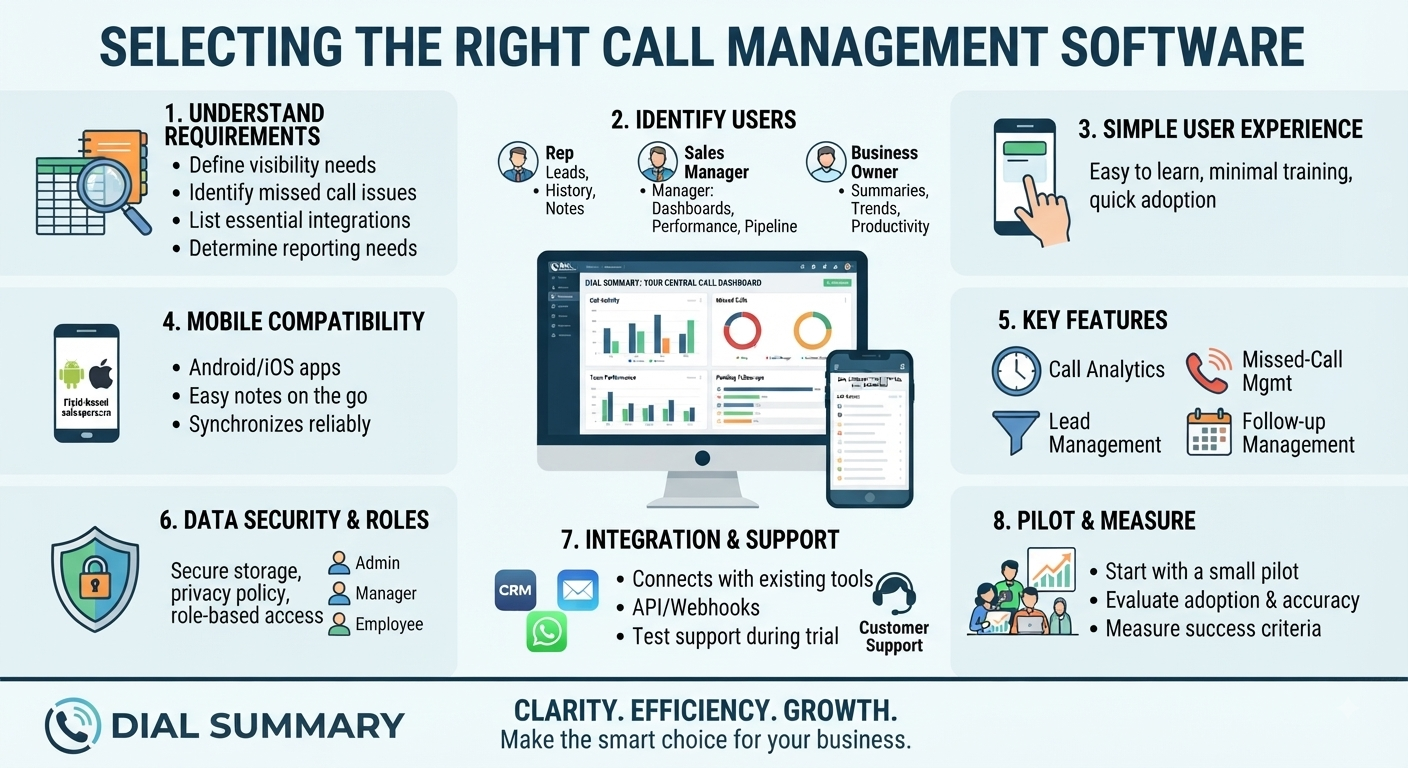
Understand Your Business Requirements

Before reviewing software, identify the problems your business wants to solve.

Ask practical questions such as:

  • Do managers need visibility into team calling activity?
  • Are missed calls being forgotten?
  • Are customer follow-ups frequently delayed?
  • Is lead information stored in spreadsheets or notebooks?
  • Do employees use mobile phones for business calls?
  • Does the business need call recordings?
  • Are managers spending too much time collecting reports?
  • Does the team require separate roles and permissions?
  • Is integration with existing software required?
  • Do employees work from different locations?

Create a list of essential requirements before comparing products. This helps prevent the business from paying for unnecessary features while missing important ones.

Identify Who Will Use the Software

Different users require different information.

Sales representatives may need:

  • Assigned leads
  • Customer contact information
  • Call history
  • Conversation notes
  • Follow-up reminders
  • Lead status updates

Sales managers may need:

  • Team activity dashboards
  • Missed-call visibility
  • Pending follow-ups
  • Representative performance
  • Lead pipeline reports
  • User management

Business owners may need:

  • Overall performance summaries
  • Conversion trends
  • Team productivity
  • Subscription and billing information
  • High-level sales reports

Choose software that provides appropriate features for each role without making the system unnecessarily complicated.

Look for a Simple User Experience

Powerful software is not helpful if employees find it difficult to use.

A complicated system may lead to:

  • Incomplete records
  • Low employee adoption
  • Incorrect data
  • Repeated training
  • Dependence on administrators
  • Continued use of spreadsheets
  • Resistance from the sales team

During a demonstration or trial, check whether users can easily:

  • Find customer information
  • Review call activity
  • Add conversation notes
  • Update a lead
  • Schedule a follow-up
  • Understand the dashboard
  • Find pending tasks
  • Complete common actions on mobile devices

The most frequently used features should be easy to access.

Check Mobile Compatibility

Many calling teams use smartphones as their primary work devices. The call management platform should support the way employees actually work.

Consider whether the software:

  • Provides an Android or iOS application
  • Works with supported mobile devices
  • Displays properly on different screen sizes
  • Allows employees to review lead information before calling
  • Makes it easy to update notes after a conversation
  • Supports remote or field-based employees
  • Synchronises information reliably
  • Clearly explains required permissions

Mobile compatibility is especially important for sales representatives who travel or work outside a central office.

Evaluate Call Analytics Features

Call analytics should provide useful information rather than only displaying large numbers.

Important information may include:

  • Incoming and outgoing calls
  • Answered and missed calls
  • Call duration
  • Call date and time
  • Activity by employee
  • Frequently contacted customers
  • Calls requiring attention
  • Daily, weekly, or monthly trends

The dashboard should help managers understand what happened and what action may be required.

Reports should also be easy to interpret. Managers should not need advanced technical knowledge to understand basic team activity.

Review Missed-Call Management

Missed calls can represent valuable business opportunities. The software should make them easy to identify and manage.

Check whether users can:

  • View missed calls clearly
  • Identify repeated calls from the same number
  • Connect a number with an existing lead
  • Assign a callback
  • Record the callback result
  • Filter pending and completed actions
  • Review missed-call patterns
  • Monitor callback response time

A missed-call list is useful, but a structured callback workflow provides greater business value.

Consider Lead Management Features

Call activity and lead management are closely connected. A customer conversation may create a new lead or move an existing opportunity forward.

Useful lead management features may include:

  • Lead creation
  • Lead assignment
  • Custom lead stages
  • Customer contact details
  • Conversation notes
  • Follow-up dates
  • Task reminders
  • Lead source
  • Search and filtering
  • Won and lost status
  • Reasons for lost opportunities

Connecting lead information with calls gives representatives better context and helps managers review the complete sales process.

Check Follow-Up Management

A strong follow-up system should help employees understand exactly what needs to happen next.

Look for features such as:

  • Follow-up date and time
  • Reminder notifications
  • Overdue task visibility
  • Daily follow-up list
  • Assigned employee
  • Follow-up purpose
  • Conversation history
  • Completion status
  • Rescheduling options

The system should make pending actions visible without requiring employees to search through multiple screens.

Understand Call Recording Capabilities

Some businesses use call recordings for quality review, training, compliance, or dispute resolution.

If recordings are required, check:

  • Which devices and operating systems are supported
  • Whether the phone allows call recording
  • Where recordings are stored
  • How long recordings are retained
  • Who can access them
  • Whether recordings can be searched
  • Whether storage requires an additional payment
  • Whether users can delete recordings
  • What happens when an employee changes devices

Call-recording laws vary by location. Businesses should obtain appropriate consent and follow applicable privacy and communication regulations.

Software availability does not remove the organisation’s legal responsibilities.

Review Data Security and Privacy

Call and lead management platforms may process phone numbers, customer names, communication notes, and other business information.

Ask the provider:

  • How is information transmitted?
  • Where is data stored?
  • Who can access customer information?
  • Are user permissions available?
  • How are passwords or authentication handled?
  • Can access be removed when an employee leaves?
  • Is there a documented privacy policy?
  • Is there a process for reporting security concerns?
  • Can business data be exported or deleted?
  • Are backups maintained?

Businesses should read the privacy policy and understand their own responsibility for collecting and processing customer data.

Check Roles and Permissions

Not every employee should have access to every customer record or administrative setting.

The platform should allow the business to define appropriate roles, such as:

  • Employee
  • Team leader
  • Manager
  • Administrator
  • Business owner

Permissions may control who can:

  • View team activity
  • Access recordings
  • Manage users
  • Export information
  • Change settings
  • Review billing
  • Delete records
  • Assign leads

Role-based access reduces unnecessary exposure of business information and makes the platform easier to manage.

Evaluate Integration Options

Businesses may already use CRM, communication, accounting, or workflow tools.

Before selecting software, ask whether it can integrate with:

  • Customer relationship management systems
  • Web enquiry forms
  • Lead-generation platforms
  • WhatsApp workflows
  • Email
  • Reporting tools
  • Other business applications
  • APIs or webhooks

Also check whether integration is included in the normal plan or requires technical development and additional charges.

An integration should solve a clear business requirement. Adding connections without a purpose can increase complexity.

Review Reporting and Export Features

Managers may need to prepare reports for meetings, audits, payroll discussions, or business planning.

Check whether the software provides:

  • Filters by employee and date
  • Team and individual reports
  • Call summaries
  • Missed-call reports
  • Follow-up reports
  • Lead pipeline reports
  • Download or export options
  • Clear date and time information
  • Consistent calculation methods

Reports should help management take action rather than simply produce more data.

Understand Setup and Onboarding

A smooth implementation is important for employee adoption.

Ask the provider:

  • How long does setup normally take?
  • Is onboarding assistance available?
  • Are training materials provided?
  • Does the team help configure company settings?
  • Is data migration supported?
  • Can existing leads be imported?
  • Are employees trained?
  • Is technical support available during rollout?

The business should also assign an internal person to coordinate implementation and answer employee questions.

Test Customer Support

Good support becomes especially important when software is used for daily sales activity.

Before purchasing, check:

  • Available support channels
  • Support working hours
  • Typical response times
  • Whether onboarding support is included
  • Availability of help documentation
  • Process for reporting technical issues
  • Whether support is available in your preferred language
  • Whether premium support costs extra

Send a genuine question during the trial period. The quality and speed of the response can reveal what future support may be like.

Compare Pricing Carefully

The lowest advertised price may not represent the total cost.

Check whether pricing depends on:

  • Number of users
  • Number of devices
  • Data storage
  • Call-recording storage
  • Premium reports
  • Integrations
  • Support level
  • Setup charges
  • Monthly or annual billing
  • Taxes
  • Data export
  • Additional modules

Ask for a written pricing explanation and read the refund or cancellation policy.

The best value comes from software that solves important business problems at a predictable total cost.

Request a Demonstration

A product demonstration helps businesses see how the platform works with realistic scenarios.

During the demonstration, ask the provider to show:

  • Employee onboarding
  • Call activity dashboard
  • Missed-call review
  • Lead creation and assignment
  • Follow-up scheduling
  • Reporting
  • Roles and permissions
  • Mobile application
  • Data export
  • Support process

Prepare questions before the demonstration and involve employees who will use the system daily.

Use a Trial or Small Pilot

When possible, begin with a small group instead of immediately deploying the software to the entire organisation.

A pilot can help the business evaluate:

  • Ease of installation
  • Employee adoption
  • Data accuracy
  • Mobile compatibility
  • Dashboard usefulness
  • Follow-up workflow
  • Support quality
  • Technical reliability
  • Training requirements

Collect structured feedback from both representatives and managers.

Do not ask only whether they liked the software. Ask which tasks became easier, which problems remained, and what additional training was required.

Define Success Before Implementation

Decide how the business will measure whether the software is producing value.

Possible success measures include:

  • Faster response to new leads
  • Fewer overdue follow-ups
  • More missed calls returned
  • Improved data accuracy
  • Reduced manual reporting
  • Better manager visibility
  • Higher employee adoption
  • Increased lead conversion
  • Improved customer response time

Review these measurements after implementation.

Software should support an improved process, not simply add another subscription.

How Dial Summary Supports Calling Teams

Dial Summary is designed to help businesses organise calling activity, leads, and follow-up workflows.

Teams can use Dial Summary to:

  • Review incoming and outgoing call activity
  • Identify missed calls
  • Understand team calling patterns
  • Maintain lead information
  • Record customer notes
  • Track follow-up requirements
  • Review team performance
  • Improve visibility across daily operations

Businesses can review Dial Summary’s features, request a demonstration, and evaluate whether the platform matches their specific workflow.

Conclusion

Choosing call management software is an operational decision, not only a technical purchase.

The right platform should match the way employees work, provide useful visibility, support customer follow-ups, protect business information, and remain simple enough for regular use.

Before making a decision, businesses should define their requirements, review security and pricing, test the platform with real users, and measure results through a small pilot.

A carefully selected call management system can help teams respond faster, organise customer conversations, reduce missed opportunities, and create a more consistent sales process.

Share: