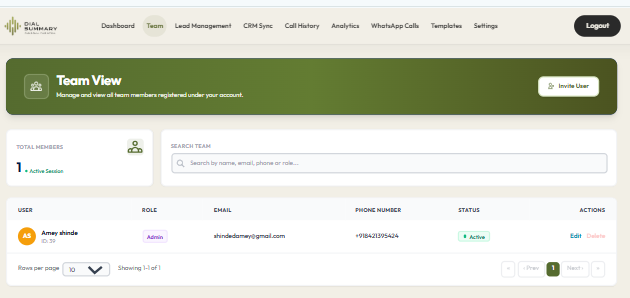
Team View: Monitor and Improve Your Team’s Calling Performance
A sales manager notices that one employee has made far more calls than the rest of the team. Another has spent longer speaking with customers but handled fewer conversations.
Who needs support? Who is managing a more demanding workload? Are customers waiting while attention is focused elsewhere?
Call totals alone cannot answer these questions.
DialSummary’s Team View helps managers review employee calling activity together, making it easier to understand workloads, investigate differences and discuss performance with context.
The goal is to help the team work more effectively—not simply to identify who has the highest number.
What Is Team View?
Team View brings employee calling information into a shared management view.
Authorised managers can review available activity for their team and use it to understand how work is distributed. Depending on the selected view and available data, this can include employee call counts, talk time and activity summaries.
Rather than requesting separate updates from every employee, a manager can begin with the information already recorded in the workspace.
The figures provide a starting point for a conversation. They do not explain every part of an employee’s work.
A representative may spend time preparing a proposal, resolving a customer issue or completing another assigned task that is not reflected in call totals.
Start With a Clear Management Question
Before reviewing the team, decide what you need to understand.
Useful questions include:
- Is the calling workload distributed appropriately?
- Are some employees handling more complex conversations?
- Has someone’s activity changed unexpectedly?
- Does an employee need help with an assigned enquiry?
- Are customer commitments being followed through?
A focused question makes the review more useful than simply scanning a dashboard for the highest and lowest numbers.
For example, if customers are waiting for callbacks, investigate ownership, availability and the relevant records. Ranking employees by total calls may not explain the delay.
Compare Employees Fairly
Two employees can have different calling patterns while both are doing their jobs well.
One may handle initial enquiries that require short conversations. Another may explain detailed proposals or manage support issues that take longer.
Before comparing their activity, consider:
- Role: Are they doing the same kind of work?
- Assignment: Are they contacting similar customers?
- Working time: Were they available for the same period?
- Experience: Is someone still learning the process?
- Other responsibilities: Were they assigned work outside calling?
- Data availability: Has the expected activity synced?
Compare similar work over a comparable period. Otherwise, a difference in the numbers may reflect the assignment rather than the employee’s performance.
A Practical Example: Understanding Uneven Call Counts
Consider this fictional situation.
A manager reviews two employees at the end of the day:
- One made 55 calls, with many short interactions.
- Another made 28 calls, with more time spent in conversation.
It would be easy to assume that the first employee was more productive.
A closer review shows that the first employee was making initial contact with new enquiries. The second was handling scheduled product discussions with customers who had already received proposals.
The manager now has two different questions to explore:
- For initial enquiries, are contact attempts reaching the right people?
- For scheduled discussions, are customers getting clear answers and agreeing on next steps?
The figures remain useful, but the comparison changes once the work is understood.
The next action might involve improving contact timing for one employee and helping the other prepare answers to recurring product questions.
Use Talk Time as Context
Talk time can help managers understand how employees spend their calling time. It should not be treated as a complete measure of effectiveness.
A brief call may successfully confirm an appointment. A longer call may involve a detailed customer requirement—or an explanation that could have been clearer.
When talk time changes, ask:
- Has the type of enquiry changed?
- Is the employee handling more complex questions?
- Are conversations producing clear next actions?
- Are a few unusually long calls affecting the total?
- Does the employee need better reference material or support?
Avoid setting expectations that encourage employees to extend calls unnecessarily or end useful conversations too quickly.
A good conversation takes the time needed to address the customer’s purpose.
Look for Workload Imbalances
Team reviews can reveal where work may need to be redistributed.
However, lower calling activity does not automatically mean someone has spare capacity. Check their other responsibilities before assigning more work.
Likewise, high activity may indicate a busy assignment rather than a sustainable workload.
Discuss:
- Upcoming callbacks and meetings
- Unresolved customer questions
- Time needed for preparation and follow-up
- Internal tasks or training
- Availability during busy periods
If an enquiry needs to move to another employee, make the handover clear. The receiving person should know what the customer needs, what has been promised and what happens next.
Investigate Changes Before Drawing Conclusions
An unexpected drop in recorded activity deserves attention, but the cause may be practical.
An employee may have been in training, dealing with a technical issue, completing a complex customer task or working from an incomplete contact list.
Start by checking the selected period and available data. Then speak with the employee.
A useful opening is:
“Your recorded calling activity looks different this week. Has something changed in your assignment, or is anything making the work harder?”
This invites information the dashboard cannot provide.
If the issue is missing or delayed data, resolve that before using the figures in a performance discussion.
Turn Reviews Into Specific Coaching
General feedback is difficult to apply.
“Make better calls” does not tell an employee what to change. A specific observation gives them something to practise.
For example:
“Several follow-ups ended without an agreed callback time. On your next few conversations, confirm when the customer would prefer us to contact them again.”
A useful coaching discussion follows a simple sequence:
- Review a relevant pattern or example.
- Ask for the employee’s perspective.
- Identify the skill or process that needs attention.
- Agree on one practical change.
- Set a time to review how it is working.
Recognise effective work as well. An employee who consistently records clear next steps may have a useful habit to share with colleagues.
Review the Calls Behind the Summary
When a team-level pattern raises a question, check the relevant records rather than relying entirely on totals.
DialSummary Full Call History can help you locate available interactions and review details such as call timing, employee and duration.
Where appropriate notes or authorised recordings are available, they may provide further context.
For broader patterns across calling activity, explore DialSummary Call Insights.
Use these views to investigate a specific question. Reviewing more information is only useful when it helps explain the situation or choose an action.
Keep Performance Discussions Focused on Improvement
Employees should understand which measures are being reviewed and why they matter.
Explain the purpose of the review, consider the work assigned and give employees an opportunity to clarify the context.
Avoid drawing broad conclusions from a single day or an isolated call.
Use team information to identify support needs, recognise effective work and improve the process.
Sometimes the most useful change belongs to the business rather than the employee: clearer product information, better lead allocation or faster internal answers may remove a recurring obstacle.
Build a Short Weekly Review Routine
A consistent review can be more useful than occasional deep investigations.
Each week:
- Check the scope: Confirm the dates, employees and available data.
- Notice meaningful changes: Look for patterns worth discussing.
- Add context: Consider assignments, working time and other responsibilities.
- Choose an action: Agree on a manageable improvement.
- Follow through: Review whether the action helped.
Keep a brief record of agreed actions so the same issue is not discussed repeatedly without progress.
Help the Team Improve, One Decision at a Time
Team View supports a clearer understanding of employee calling activity. Its value comes from combining the recorded information with knowledge of the work and conversations with the people doing it.
Start with one question about workload, customer follow-up or an employee’s support needs. Review comparable information, check the context and agree on a specific next step.
Better team management begins with understanding the work behind the numbers.
Visit the DialSummary Help Centre for available product guidance.