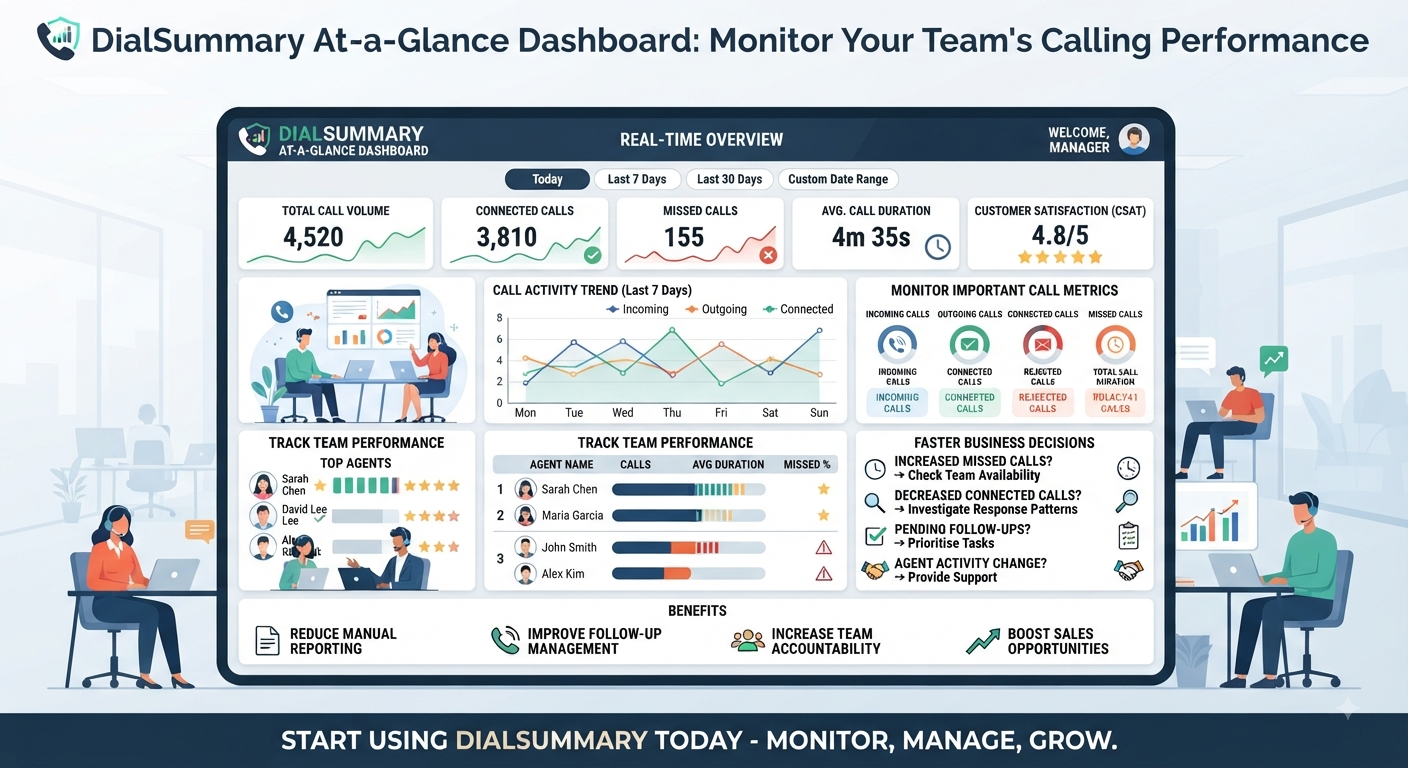
Title: At-a-Glance Dashboard: View Your Complete Calling Performance in One Place
The working day has started, and customer calls are already coming in. Before assigning more work, a manager needs to understand what is happening across the team.
How much calling activity has been recorded? Are missed calls increasing? Does a particular employee’s workload need a closer look?
Finding those answers should not require opening several spreadsheets or requesting individual updates.
DialSummary’s At-a-Glance Dashboard brings calling summaries into one view, giving authorised users a starting point for reviewing activity and deciding where to look next.
A useful dashboard helps you move from checking numbers to choosing an action.
What Does the Dashboard Help You Understand?
The dashboard provides an overview of the calling information available in your workspace.
By selecting the relevant period and user scope, you can review activity without beginning with individual call records.
It helps you ask practical questions:
- How much calling activity took place during this period?
- How is activity distributed across the available call categories?
- Does talk time look different from a comparable period?
- Is a change worth investigating?
- Which employee or set of records needs a closer review?
The dashboard is a summary of available data, not a complete explanation of every customer interaction.
Its figures should be considered alongside the selected filters, working conditions and data that has successfully synced.
Start With the Right Date Range
Before interpreting a number, check the period it covers.
A view of today’s activity answers a different question from a monthly summary. Likewise, a partial working day should not be compared directly with a completed day.
Choose the range that fits your task:
- Today: Review activity so far and identify questions needing attention.
- A recent week: Look for recurring patterns.
- A monthly period: Review broader changes in workload.
- A custom range: Examine a specific campaign, event or working period.
When comparing periods, consider differences in working days, holidays and employee availability.
A correct number can still lead to a poor conclusion if the comparison is unsuitable.
Check Whether You Are Viewing One Employee or the Team
The user filter changes the scope of the information you are reviewing.
A team-wide summary can help you understand overall activity. An individual view can help investigate a particular assignment or change.
Before sharing a figure or discussing it with an employee, confirm which scope is selected.
This avoids simple mistakes, such as comparing one person’s activity with a team total or assuming that a filtered view represents the whole business.
For a closer look at employee activity and workload, explore DialSummary Team View.
Read the Numbers Together
A single total rarely explains how the day is going.
More calls may reflect increased customer demand, additional outbound attempts or a change in the team’s assignment. More talk time may reflect detailed conversations rather than a larger number of customers reached.
Read the available measures together:
- Call volume shows the amount of recorded activity.
- Call categories help distinguish different types of contact.
- Talk time adds context about time spent in conversations.
- User and date selections define whose activity you are viewing and when.
Avoid treating higher values as automatically better. The useful question is whether the activity supports the work your team needs to complete.
A Practical Example: Checking a Busy Afternoon
Consider this fictional situation.
At 2 p.m., a manager opens the dashboard and notices more missed calls than expected.
Instead of immediately asking the team to make more outbound calls, the manager checks:
- Whether the dashboard is showing today’s activity.
- Whether all relevant employees are included.
- Whether incoming activity has also increased.
- Which individual records need attention.
- Whether those customers have already received callbacks.
The review reveals that several missed calls occurred during a team meeting. Some customers were contacted afterwards, while others still need a response.
The manager assigns the remaining callbacks and considers moving the meeting to a quieter period.
The summary highlighted the issue. Reviewing the underlying activity made the response specific.
Use Changes as a Reason to Investigate
An unexpected rise or fall in activity can be useful, but it does not explain its own cause.
Lower recorded activity could reflect:
- A shorter working period
- Training or internal meetings
- A different type of assignment
- Time spent preparing proposals
- Employee absence
- Delayed or incomplete sync
Similarly, an increase in calls could be associated with a new enquiry source or repeated attempts to reach the same contacts.
Check the circumstances before turning a change into a performance judgement.
A dashboard works best when it helps managers ask informed questions.
Move From the Overview to the Relevant Details
Once a summary raises a question, choose the view that can help answer it.
To Find a Particular Interaction
Use DialSummary Full Call History to locate available call records and examine details such as timing, employee and duration.
This can help when you need to understand a sequence of contact attempts or confirm when a customer last called.
To Explore a Broader Pattern
Use DialSummary Call Insights to investigate patterns across calling activity, such as busy periods and call-type breakdowns.
The dashboard provides the starting point. A more focused review helps explain what deserves action.
Build a Short Daily Review Routine
A dashboard does not need to become something you watch continuously.
A few purposeful checks can help structure the day.
At the Start of the Day
Confirm the selected period and review any relevant activity from the previous working period. Identify questions that need follow-up rather than assuming every outstanding item appears in the summary.
During the Day
Check whether activity differs meaningfully from expectations. If something looks unusual, review the relevant records and speak with the team.
Before Finishing
Look back at the questions identified earlier. Confirm whether actions were completed or assigned, and note anything that needs attention the next day.
Keep the routine focused on decisions. Repeatedly checking the same totals without acting adds little value.
Avoid Common Dashboard Mistakes
Comparing a Partial Day With a Full Day
Allow for the time covered before concluding that activity has dropped.
Forgetting an Active Filter
Check the date and user selections before quoting a figure.
Treating Call Volume as Sales Results
Calls represent activity. Confirmed sales outcomes require the relevant customer and business records.
Judging Employees From One Metric
Consider role, workload and customer needs alongside the numbers.
Assuming Missing Data Means No Work Happened
Check access, filters and sync before drawing conclusions.
Expecting Every Communication Channel to Appear
Confirm which data sources your current setup supports. Regular call tracking should not be treated as automatic capture of every messaging or internet-calling service.
Turn Each Review Into a Clear Next Step
A useful dashboard review ends with a decision, even if that decision is to gather more context.
An action might be:
- Check a group of missed-call records.
- Confirm who owns a pending callback.
- Investigate a change in an employee’s assignment.
- Review coverage during a busy period.
- Resolve a data-sync issue before comparing performance.
For each action, identify the person responsible and when it should be reviewed.
“Calling activity changed” is an observation. “Review the affected records and assign outstanding callbacks” is an action.
Start With the Overview, Then Follow the Question
DialSummary’s At-a-Glance Dashboard helps you begin the day with a clearer view of recorded calling activity.
Its value comes from using the right scope, reading the figures in context and moving to the relevant details when something needs attention.
Start with one management question. Check the period and filters, review what the information supports, and agree on a practical next step.
For available product guidance, visit the DialSummary Help Centre.