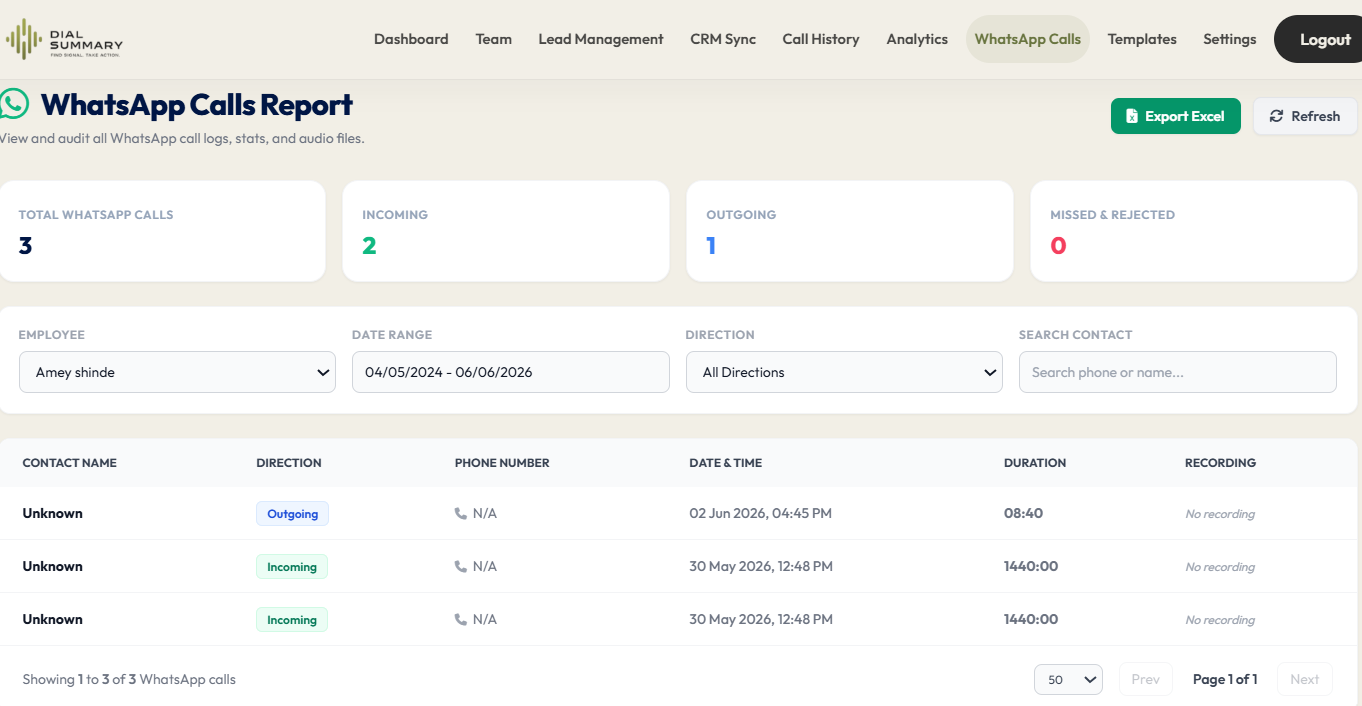
WhatsApp Calls: Keep Customer Communication Organized in One Place
A customer sends a WhatsApp message asking for product details. Later, they call to discuss pricing. The next morning, another employee contacts them without knowing what was already agreed.
The customer has to explain the same requirement again.
When conversations move between regular calls, WhatsApp and internal discussions, keeping track of the next step becomes difficult. Important details may remain on one employee’s phone while the rest of the team works from incomplete information.
An organised process helps your team preserve the business context: what the customer needs, what was promised and who should respond next.
WhatsApp Calls and DialSummary: Understand the Current Scope
WhatsApp calls and regular mobile-network calls are different communication channels. Tracking one does not automatically provide access to the other.
WhatsApp call tracking is identified as a planned DialSummary capability. Do not assume that WhatsApp calls, recordings or chat history automatically appear in the current regular-call workflow.
You can visit the DialSummary WhatsApp Calls page for the feature overview and confirm current availability with the product team before relying on it.
In the meantime, your team can keep customer communication organised by recording relevant outcomes and next actions in its approved lead-management workflow.
The practical steps below describe that process. They do not depend on automatic WhatsApp capture.
Keep the Customer’s Next Step in a Shared Record
A conversation can be useful without being copied in full.
After a meaningful WhatsApp interaction, record the details an authorised colleague would need to continue the enquiry:
- Customer requirement: What are they trying to achieve?
- Information shared: What has the team already sent or explained?
- Outstanding question: What still needs an answer?
- Commitment: What did your business agree to do?
- Owner: Who is responsible?
- Next action: What should happen, and when?
For example, “Spoke on WhatsApp” tells a colleague very little.
A more useful note would be:
Discussed the customer’s requirement for a 10-person team. They requested pricing and setup details. Priya will send the information by Thursday afternoon. The customer asked for a callback on Friday at 11 a.m.
This preserves the working context without requiring everyone to search through the original conversation.
A Practical Example: From WhatsApp Enquiry to Sales Follow-Up
Consider this fictional situation.
A customer contacts an employee on WhatsApp after seeing a product demonstration. They ask whether the service would suit a small support team.
During the conversation, the customer explains that their manager needs a short proposal before approving another meeting.
The employee records:
- Requirement: A solution for a small support team
- Decision process: The manager will review a proposal first
- Information needed: Pricing, setup steps and support details
- Next action: Prepare and send the proposal
- Follow-up: Contact the customer at the agreed time
- Owner: The employee managing the enquiry
Before following up, the employee checks whether the proposal was sent and whether the customer has replied.
The next message can then be specific:
Hi [Customer name], I’m following up on the proposal shared on [date]. Were you and your manager able to review the setup details, or is there anything you would like us to clarify?
The square brackets are placeholders to replace manually before sending.
If a colleague takes over, the same record provides enough context to continue without restarting the discussion.
Confirm Important Commitments Clearly
Spoken conversations can leave room for different interpretations.
“I’ll get back to you tomorrow” could mean a progress update, a completed quotation or a final answer. Be specific about what the customer should expect.
After a conversation, a short written confirmation can help:
Hi [Customer name], confirming our discussion: I’ll send the product comparison by Wednesday afternoon. We’ll then speak on Thursday at 2 p.m. to review your questions.
Please let me know if I have missed anything.
Only confirm commitments that were actually agreed and that your team can meet.
Record the same next step in the team’s working system so the promise does not remain visible only in the WhatsApp conversation.
Use Templates Without Losing the Conversation Context
Reusable wording can help employees prepare routine confirmations and follow-ups.
However, a template should be checked against the latest interaction before it is sent.
Personalise:
- The customer’s name
- The product or service discussed
- The information they requested
- The agreed date and time
- The next action
- Any relevant document or link
A customer who has already approved a proposal should receive the next steps, not another message asking whether they have reviewed it.
Explore the DialSummary Mobile Templates guide for guidance on reusable messages.
Message templates and call tracking are separate capabilities. Creating a template does not enable automatic WhatsApp call or chat synchronisation.
Assign One Person to Coordinate the Follow-Up
Several employees may contribute to an enquiry, but responsibility for the next action should be clear.
Without an owner, one person may assume a colleague sent the quotation while another assumes the customer has already been called.
Before handing over an enquiry, confirm:
- Who is taking responsibility
- What the customer is waiting for
- Which information has already been shared
- Whether a response deadline was agreed
- What the receiving employee needs to do first
For a closer look at organising ownership and next actions, visit DialSummary Lead Tracker.
A handover is complete when the receiving employee understands the task—not simply when their name is added to a record.
Check Both the Record and the Latest Conversation
Manual notes can become outdated.
A customer may reply after the record was updated, reschedule a callback or say that the information is no longer needed.
Before contacting them again, check the latest available context through the channels you are authorised to access.
If colleagues are working on the same enquiry, coordinate before sending another message or making another call.
This helps prevent:
- Repeated introductions
- Duplicate information requests
- Follow-ups after a customer has already responded
- Conflicting commitments from different employees
Keep Shared Notes Focused on Business Needs
Not everything in a WhatsApp conversation belongs in a shared customer record.
Record the information necessary to manage the enquiry. Avoid copying unrelated personal messages, unnecessary screenshots or details that colleagues do not need.
Use your organisation’s approved accounts, systems and sharing practices. Access to a customer conversation should have a clear business purpose.
A concise summary of the requirement and agreed action is often more useful than a large, unstructured collection of messages.
What to Confirm Before Using Automated WhatsApp Tracking
Before building a workflow around a future or newly released integration, ask the product team to clarify:
- Whether the capability is available for your account and installed version
- Which devices and app configurations are supported
- What information is captured
- Whether call activity, messages and recordings are handled separately
- Which permissions and setup steps are required
- Who can access the resulting information
Confirm the specific capability you need rather than assuming that “WhatsApp integration” includes every type of communication.
You can use the DialSummary Help Centre to find available product guidance.
Keep the Conversation Moving, Even When the Channel Changes
Customers may switch from a regular call to WhatsApp and then return to another channel. They still expect your team to understand what has already been discussed.
A consistent record of requirements, commitments and ownership helps maintain that continuity.
Start with a simple habit: after a meaningful conversation, record the outcome and the next action. Before following up, review the latest context.