Inbuilt Dialer
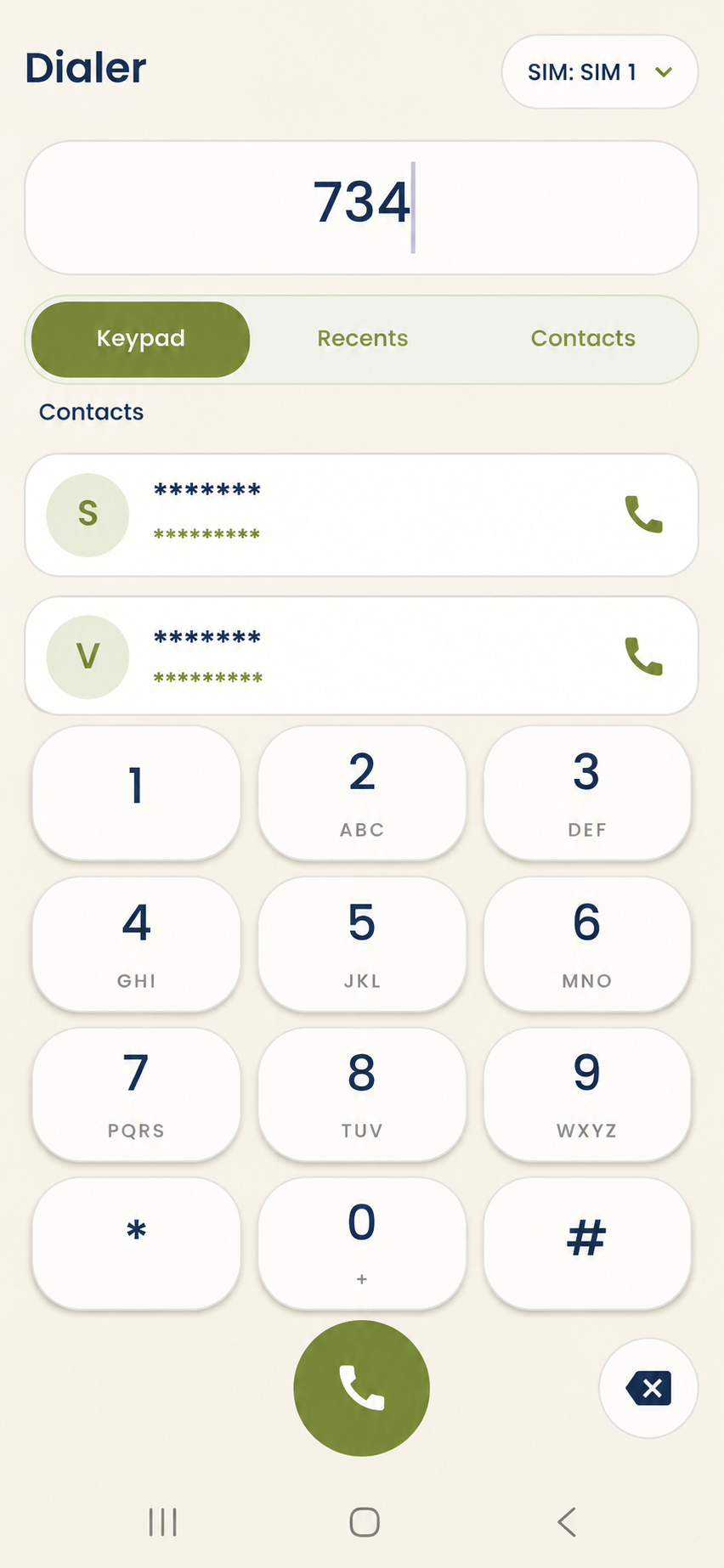
To access this feature, open your DialSummary Mobile App or click on the Inbuilt Dialer widget in your web interface. Make outgoing calls directly with zero app switching, ensuring all durations, numbers, and notes stay linked automatically.
Setup Instructions
Step 1
Launch the DialSummary mobile application on your Android smartphone.
Step 2
Tap the dialer keypad icon at the bottom of the screen to open the smart calling dial pad.
Step 3
Type any phone number or start typing a contact's name — predictive matching surfaces recent leads instantly.
Step 4
Select SIM 1 or SIM 2 if using a dual-SIM handset to keep business and personal calls separated.
Step 5
When the call ends, an automatic post-call modal appears allowing the agent to submit notes and update the lead stage in 5 seconds.
Got Questions?
Frequently Asked Questions
It eliminates juggling multiple apps, speeds up outbound dialing, and prompts the agent for notes immediately when the call finishes.
Yes. Every call placed through the inbuilt dialer is logged with exact talk-time, start/end timestamps, and linked lead history.
Yes. The lead card appears above the keypad, displaying previous interaction summaries and current pipeline stage.